Kudos to Brett Fisher (https://twitter.com/bretfisher) who has done an amazing job creating this course. Thanks!
http://labs.play-with-docker.com
New command syntax
- docker container ls
- docker container ls -a
- docker container start
- …
What does docker container start actually do?
- Looks for the image in the image cache
- Then looks in remote hub (docker hub default)
- Downloads latest version
- Starts a new container based on that image
- Gives it a virtual IP !!INSIDE!! the docker engine on a private network
- Opens up port 80 on host and forwards to port 80 in container (with the --publish command)
- Starts container using the CMD in the image Dockerfile
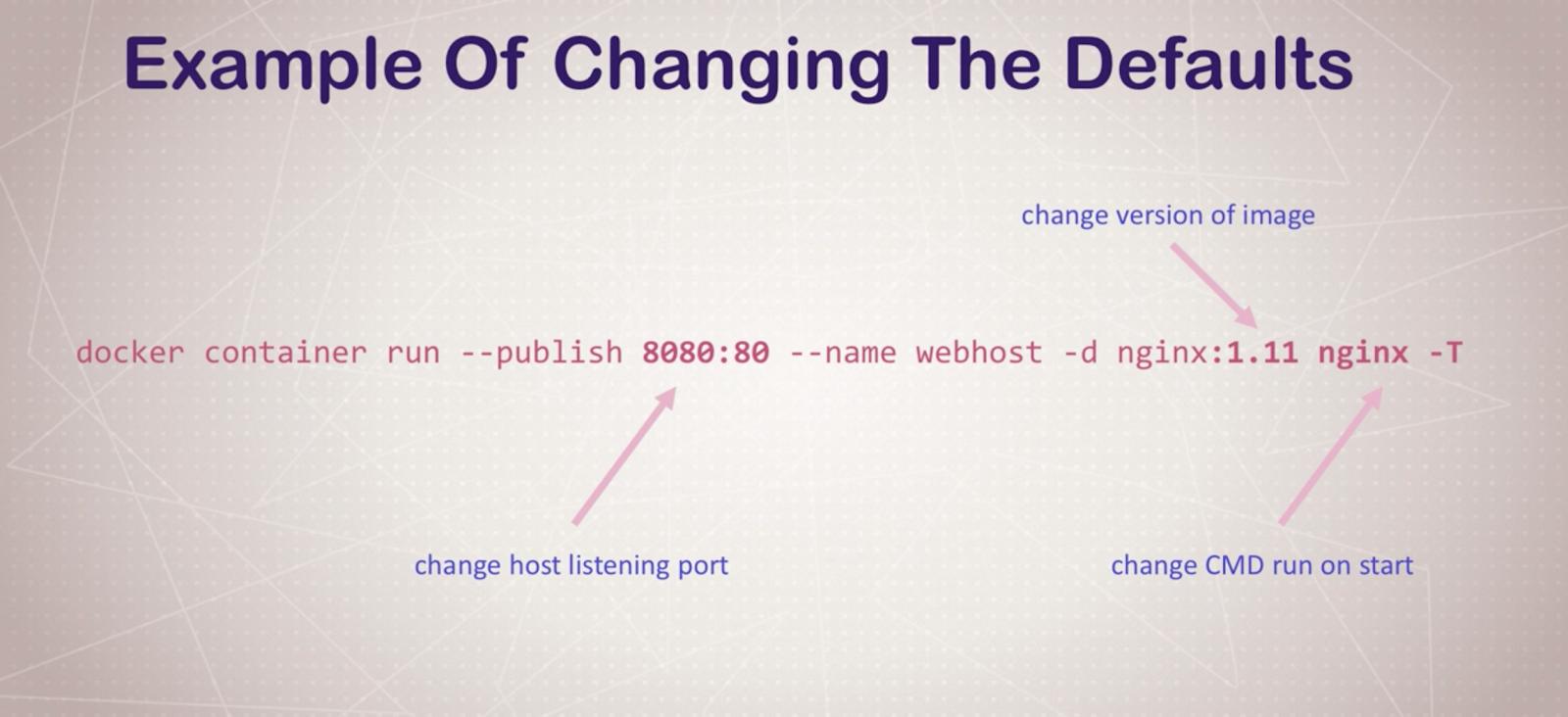
Containers aren’t really VM-s: THEY ARE JUST PROCESSES
CLI process monitoring
- docker container top: list running processes in a specific container
- docker container inspect [ID/NAME]: gets metadata for that container (like volume, config, etc..
- docker container stats: shows live performance measures for all the containers running
Getting a shell inside a container
- docker container run -it: start new container interactively (with CLI, e.g. with bash)
- docker continer exect -it: run additional command in existing container (no ssh needed!!)
-it means: interactive (keeps session open to keep terminal input), -t pseudo-tty (simulates a real terminal, like what ssh does)
Docker networks
-p: exposing ports
BUT: you don’t have to expose all the time, you can create sub virtual networks which are going to “understand” and “see” each other, so you can just define a communication without exposing ports.
docker container inspect --format '{{ .NetworkSettings.IPAddress }}' webhost: just the IP . NEAT
Communicating with two virtual networks (subnetworks) is only able to do by going out to the exposed ports to the outside and communicate over there.
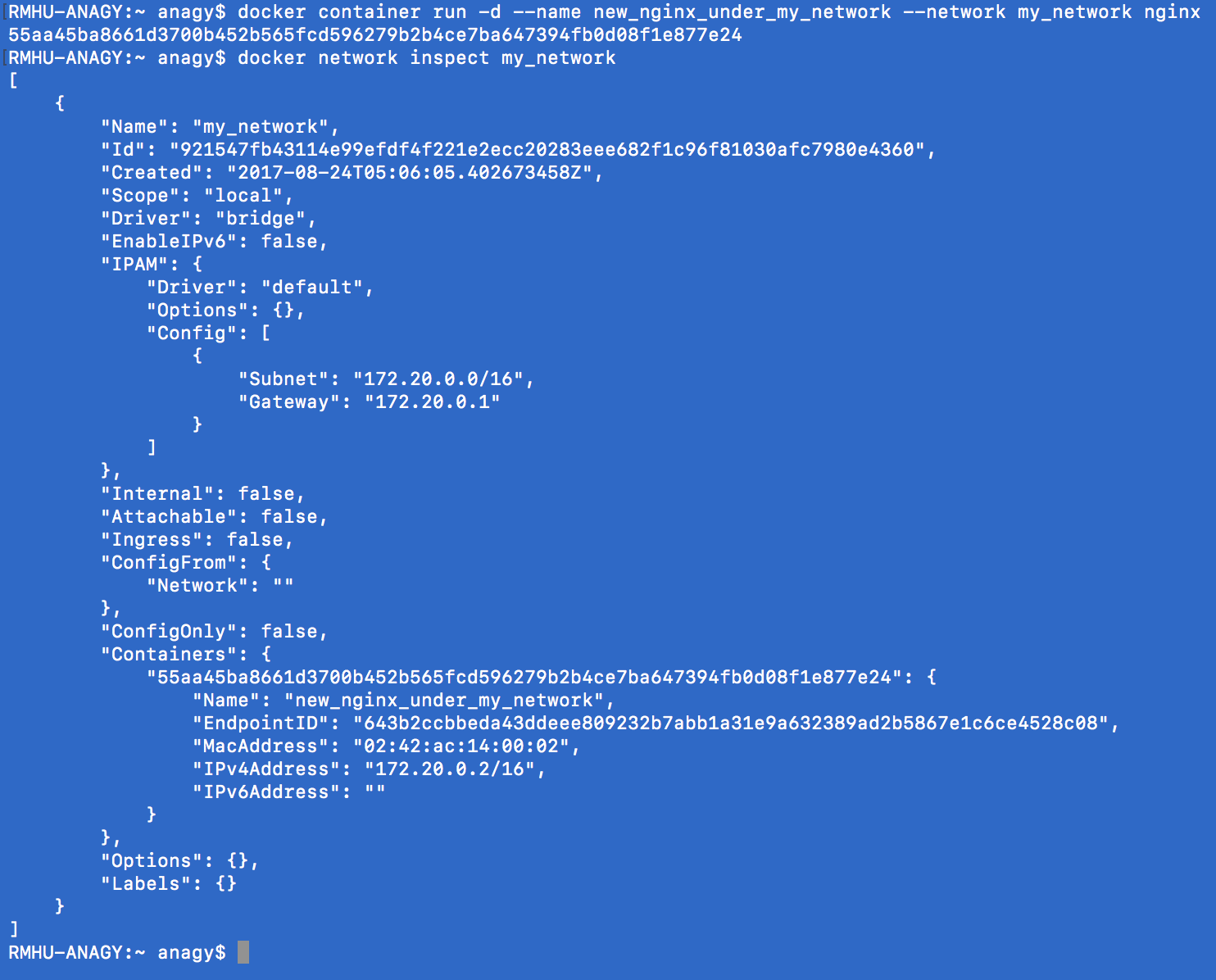
Docker network CLI
- docker network ls: networks
- docker network inspect: get metadata from a network
- docker network create --driver: creates a network
- docker network connect / disconnect
With docker swarm this is easier to do!
Docker container DNS
Docker daemon has a built-in DNS server that container use by default.
Note: IP-s are not good way to communicate, use names instead! Apps can fail and get new IP address, but it can fall back to a name with a different ID still!
Container images
What’s in an image:
- App binaries and dependencies
- Metadata about the image data and how to run the image
Download an image from Docker Hub.
docker pull [OPTIONS] NAME[:TAG|@DIGEST]
Image layers
- Image layers:
- docker image history nginx
- history of the image layers
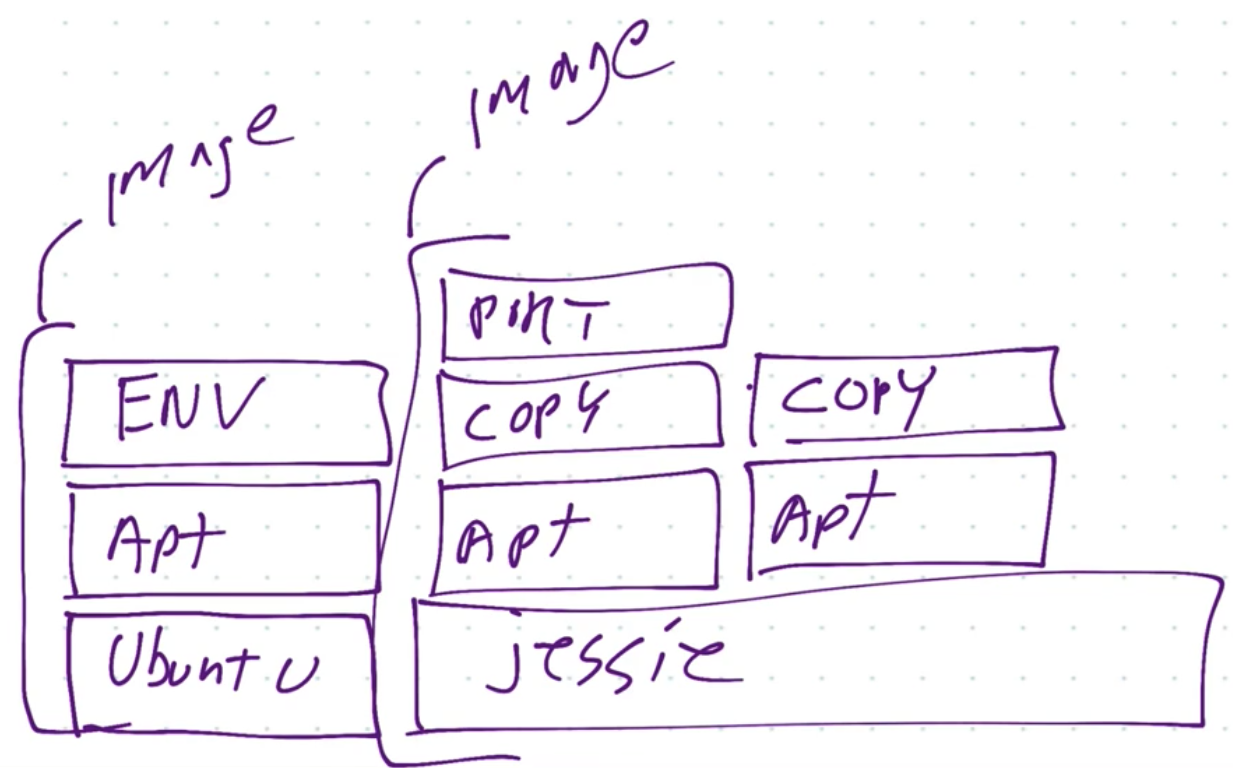
- basically an image layer is a new command / change to the previous one, e.g. like the base image layer is ubuntu, and then apt-get -ing something (like mysql), and that’s going to be the next image layer
- On the picture above you can see how caching is done: if 2 images are using jessie image layer, it is not going to be dupicated, both images will use the same jessie image (layer)
- Image layers are saved and basically attahed together for an image (so it can save space)
- docker image inspect nginx
- Image tagging and pushing to docker hub
- a very similar process like git
- Dockerfile
- instructions how to build our image
- FROM: which is the starting image
- ENV: set environment variable
- RUN: run commands
- EXPOSE: expose port (you still have to run -p if you would like to expose this to the outside) - so basically I am ALLOWING the image to be exposed, but I still have to do it explicitly!
- CMD: run a command when container is run
- General best practice: keep the less changing things on the top of the Dockerfile and and the more changing at the bottom
Persistent Data
Volumes
Persistent data for images.
docker volume ls
Bind Mounting
Maps a host file or directory to a container file or directory.
Basically just two locations pointing to the same file(s).
CAN’T USE IN DOCKERFILE, MUST BE IN container run .
That’s really good for development - binding local files to the containers
Docker-compose
You can use sub containers to communicate with each other. Neat!
docker compose up - this is starting all the containers which are defined in docker-compose.yml file.
With docker-compose you can manage a multi-container environment easily.
Docker swarm
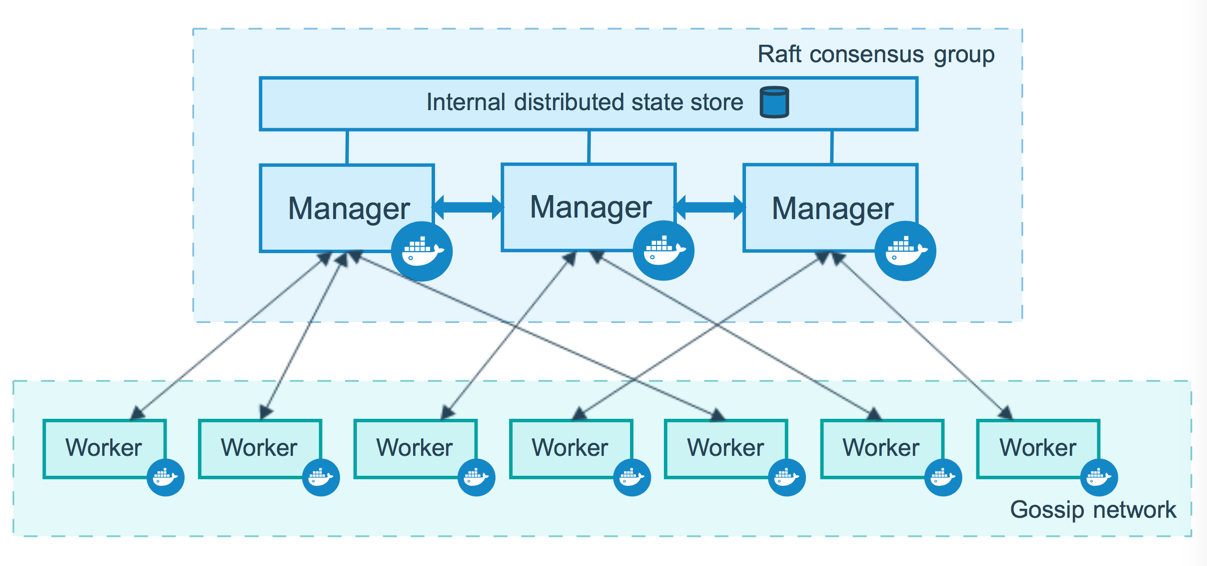
Server clustering solution.
Can orchestrate the lifecycle of your containers.
docker swarm init - enables swarm mode in an environment (so you can run your own swarm in your computer)
With the swarm API we are not directly communicating with containers, rather we are just communicating with the orchestration which will make sure the commands will be executed, and e.g. if a service dies, it will make sure it re-runs it!
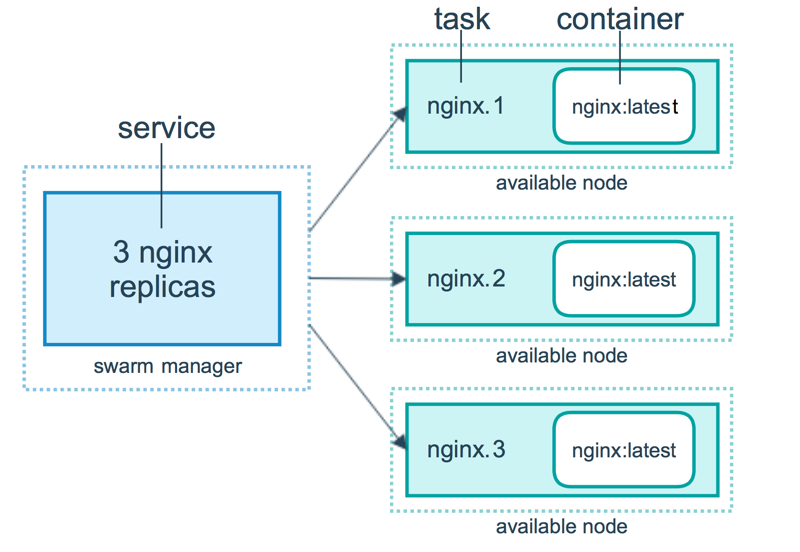
Routing mesh
The routing mesh enables each node in the swarm to accept connections on published ports for any service running in the swarm, even if there’s no task running on the node. The routing mesh routes all incoming requests to published ports on available nodes to an active container.
Stacks
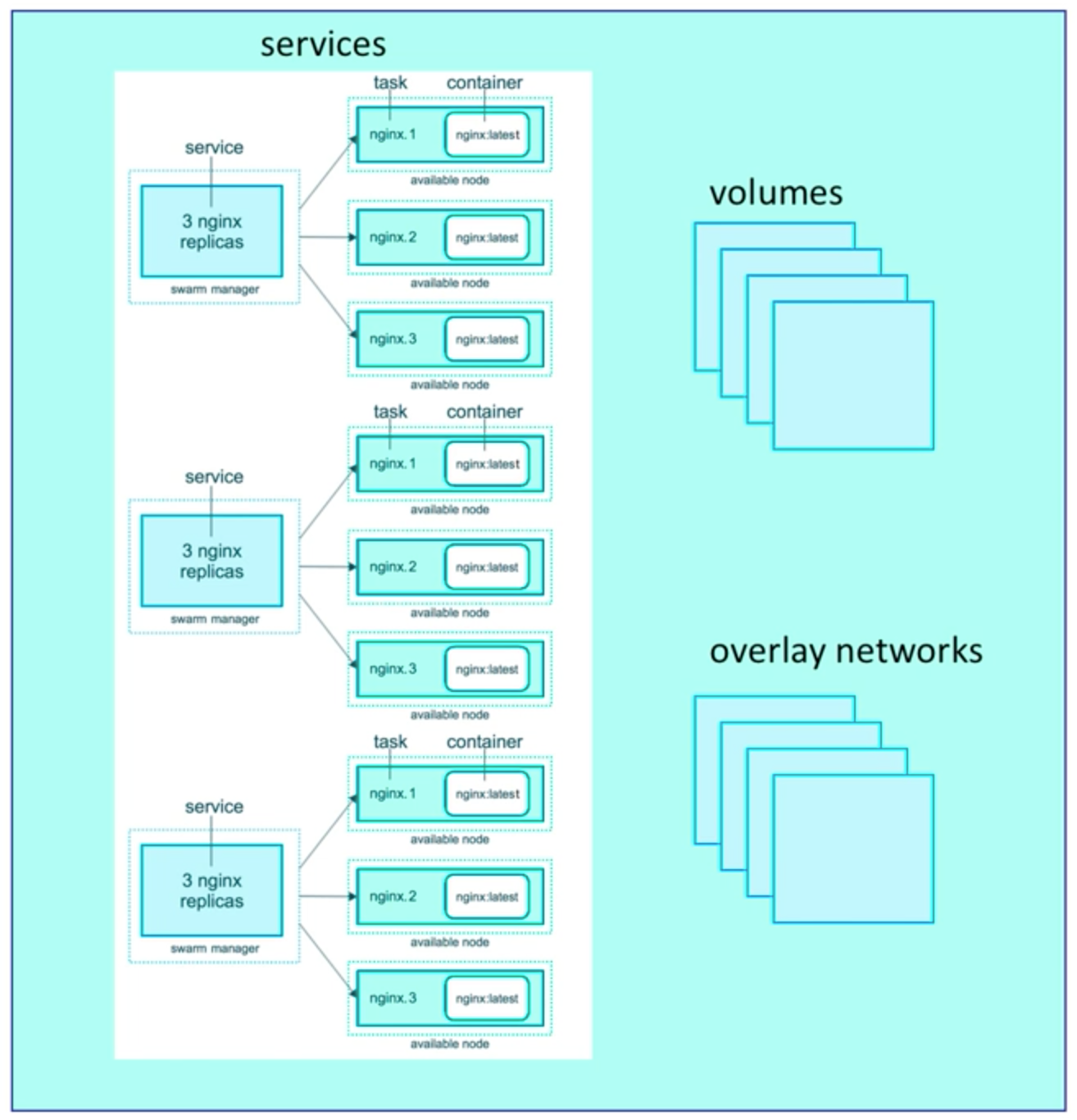
Basically compose files for swarms.
docker stack deploy
Docker compose ignores deploy and swarm ignores build. Separation of concerns.
docker-compose cli not needed on Swarm server!
1 stack → 1 swarm!
Secrets
Easiest “secure” solution for storing secrets in Swarm.
Secret:
- usernames, passwords
- TLS certificates and keys
- SSH keys
- Any data you would prefer not be “on front page of news”
SWARM & STACK & SECRETS are cool!
