inside a directive the function should be not declared like the "var"-y way
function xy(){..}
-- good
var xy = function(){..}
- not good
Most of the bugs come from this mistake: you should be injecting via the array notation the dependencies, not like
function ($scope){..}
but
['$scope', function(scope){..}]
This messes up the uglification --> arguments will be uglified, so Angular's compilation will not understand what you want to inject.
If you're defining a controller inside a directive, you have to be aware injecting dependencies, like '$element' and such. Better way is to define it on the module like this:
angular.module("App").controller('SwiperController',['$element', function ($element) {..}]);
 angular.module("App").directive('someDirective', SwiperContainer)
function SwiperContainer() {return {restrict: 'E',transclude: true,controller: 'directiveController',template: '<div class="swiper-container {{containerCls}}"><div class="swiper-wrapper" ng-transclude></div></div>'}}
ES6: if you're writing a service, the name of the class should start with a capital letter!
If you are creating a big project, you are going to have problems with the maintenance of your code. It is a common solution to this problem to use OOP methodology. Fortunately, JavaScript gives you the tool to be able to use these concepts.
There are lots of ways to do this, I am going to cover two big techniques to reach your goal: to be OO. First, you have to understand the basic concepts behind the prototypical behaviour of JavaScript.
Prototypal inheritance (object literal)
Let's look at this example
var parent = {
    get: function fn(){
        return this.val;
    },
    val:42
};

var child = Object.create(parent);
child.val = 69;
var grandchild = Object.create(child);

parent.get(); //42
child.get(); //69
grandchild.get(); //69
E.g. what happens at the child.get(); call? The value attribute is set to 69. That's clear. But what will be it's get function? Here comes the cool part. Obviously the child object does not implement any get functions, so the JavaScript engine will seek for it in the prototype chain. It will go back to it's prototype object (an dif there is no implementation of get, it will look at it's prototype, etc.. That's what we call 'prototype chain'.), and call it's get function, however the this keyword is going to reference to the child object. Pretty neat, isn't it?
For more information about Object's create function check out this link.
An important note: polymorphism is also available in JavaScript (just like in e.g. JAVA):
var greatgrandchild = Object.create(grandchild);
greatgrandchild.get = function() {
    return this.val + " is my val."

};
greatgrandchild.get(); //"69 is my val."
This model is very similar to what we learned before. It has constructor as well, but this time it will point back to the function. So basically the function we create will be the constructor of our class. We can do this by calling the keyword new.
var XXX = function() {
    console.log("Here I am, sitting on a tree.");
};
XXX.prototype.constructor; //function () {console.log("Here I am, sitting on a tree.");}
var x = new XXX(); //"Here I am, sitting on a tree."
So every time we create a function, two objects are created: the function object and the prototype object, who holds a constructor variable, who is pointing back to the function object. A bit weird.
As we see, every function is a contructor in it's own way, however, not every function was meant to be a class.
So how can we do inheritance with this model?
It is very similar to the previous object notation inheritance, but this time we have to give explicitly a value to the object's prototype variable, like the following.
//class Animal
var Animal = function(_feet) {
    this.feet = _feet;
};
Animal.prototype.eat = function() {
    console.log("I am eating, omnomnom..");
};
Animal.prototype.info = function() {
    console.log("I have this amount of feet: " + this.feet);
};

//class Cat extends Animal
var Cat = function(_feet, _miceHaveEaten) {
    Animal.call(this, _feet);
    this.miceHaveEaten = _miceHaveEaten;
    var privateVariable = "This is not available outside the class!";
};
Cat.prototype = new Animal();
Cat.prototype.purr = function() {
    console.log("Purrrrrr.........");
};
//polymorphism
Cat.prototype.info = function() {
    console.log("I have eaten this amount of mice so far: " + this.miceHaveEaten + ", also I have " + this.feet + " feet.");
};

var unicellular = new Animal(0);
unicellular.eat();
unicellular.info();

var cico = new Cat(4, 9001);
cico.eat();
cico.purr();
cico.info();
Important note: if we declare a e.g. function in a class with the keyword this, it is going to be assigned to every instance of the class. Typically we don't want to do this, so we want to assign it only to the class's prototype.
Important note #2: we can declare private variables inside a class as you can see in the declaration of the class Cat. This can be done by easily using the var keyword, not using the reference to the object with the this keyword.
Not so important, but very interesting note: you cant change the value of this with the '=' operator. If you want to do a call like the following: this="this"; , the browser will give a ReferenceError: Invalid left-hand side in assignment. error.
I highly recommend you to try all these code snippets in your browser's console for example to get a more in depth understanding of these concepts.
Exercise
Create a class called "Orc" using the classical model. It has an "ugliness" property which is set in the constructor. This property is a Number between 0 and 100, the default value is 100. This class has a method called "intimidate", which writes to the console "You will fear me cuz my ugliness index is: " plus the object's "ugliness" property.
Create a subclass "UrukHai" which inherits from the class "Orc". It has one other property than "Orc"'s, this is called "strongness", a Number between 0 and 10, the default value is 0. It has a new method called "attack", which writes to the console: "I will crush you cuz my ugliness index is {{ugliness}}, and my strongness is: {{strongness}}".
Also create some instances of the classes showing all the methods of a class.
//class Orc
var Orc = function(_ugliness) {
    if (_ugliness > 0 && _ugliness < 100) {
        this.ugliness = _ugliness;
    } else {
        this.ugliness = 100;
    }
};
Orc.prototype.intimidate = function() {
    console.log("You will fear me cuz my ugliness index is: " + this.ugliness);
};

//class UrukHai extends Orc
var UrukHai = function(_ugliness, _strongness) {
    Orc.call(this, _ugliness);
    if (_strongness > 0 && _strongness < 10) {
        this.strongness = _strongness;
    } else {
        this.strongness = 0;
    }
};
UrukHai.prototype = new Orc();
UrukHai.prototype.attack = function() {
    console.log("I will crush you cuz my ugliness index is " + this.ugliness + ", and my strongness is: " + this.strongness);
};
First of all let me discuss about the keyword this in JavaScript. this always refers to the “owner” of the function we're executing, or rather, to the object that a function is a method of. So e.g. create an object called obj like this:
Here the this keyword refers to the object (obj) itself because we are going to call this function from the object's context. A golden rule here is to look at who called the function. Another example could be a global function:
function globalFunction() {
    console.log(this);
}
This can be confusing, because a man could think 'so who is calling this function? Who is the owner?
Well, JavaScript has a bad habit of dealing with variables: the function will be assigned to the global variable, in a browser it is the window object. So right now these two calls are equivalent:
globalFunction();
window.globalFunction();
Therefore in the function globalFunction, this will refer to the global window object.
Now let's move on to the next step to understand the functions bind, call and apply.
With these functions we can manipulate the keyword this in a function. Very interesting, and indeed, we do need these kind of functions. Why? E.g. jQuery's forEach call on a set of HTML elements would be very funny to use if the keyword this would not be the element of the iteration, isn't it? So the implementation includes the the function call to make sure, this is referred to the variable of the iteration.
But let's take a look back to our example. How can we force obj 's getX function to reference the this keyword to a variable we want to give? The solution is what (hopefully) you think: call, apply and bind functions. Let's see on examples, what is happening with each cases:
var otherObj = {
    x: 99
};
obj.getX.call(otherObj); //99
obj.getX.apply(otherObj); //99
var myGetXFunction = obj.getX.bind(otherObj); //returns a function
myGetXFunction(); //99
What is happening here? call will manipulate the this keyword to our variable in the first argument inside the function. The only difference between call and apply is apply lets you invoke the function with arguments as an array; call requires the parameters be listed explicitly.
However, bind will not execute the function. bind will only give a reference to a function, which is similar to the original function, but the keyword this is changed to our variable. Very elegant!
I hope you understand now more the meaning and reason behind these functions.
A JSFiddle example is below:
So Idecided to make some very simple but enlightetning examples in JAVA and JavaScript:
JAVA:
import java.util.*;

public class Adam {
 public static void main(String[] args){
  String adam = "adam";
  Integer notPrimitiveInteger = 10;
  int primitiveInteger = 20;
  ArrayList arrList = new ArrayList();
  arrList.add(1);
  arrList.add(2);
  doSomething(adam,notPrimitiveInteger,primitiveInteger,arrList);
  System.out.println(adam);
  System.out.println(notPrimitiveInteger);
  System.out.println(primitiveInteger);
  System.out.println(arrList.size());
 }
 private static void doSomething(String adam,Integer notPrimitiveInteger,int primitiveInteger,ArrayList arrList){
  adam = "notAdam";
  notPrimitiveInteger = 500;
  primitiveInteger = 7000;
  arrList.add(3);
 }
}
//Ignore this line :)
And the output is:
adam
10
20
3
So what is happening?
Basically every time you are making expression's like this:
blabla = "blabla";
every time it's like a new object is created (in fact not!, but broadly that's the case, learn more here). So it's like you are using the new String(".."); expression, but it's not showed. So when you're about to pass a String or an Integer object to a function , you could get the value of it, but if you want to change it, it will be not changed, because the "=" expression is like making a new object. Again: not making new object, but it behaves like it is.
And what about the ArrayList?
The ArrayList's add(..) function does not make a new ArrayList object! It's like you're working with it's reference, so the original ArrayList object will be changed!
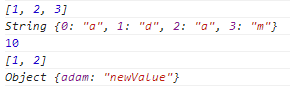
JavaScript:
 var adam = new String("adam");
 var integ = 10;
 var arr = new Array();
 arr.push(1);
 arr.push(2);
 arr.push(3);
 var obj = new Object();
 obj.adam = "oldValue";
 console.log(arr);
 doSomething(adam,integ,arr,obj);
 function doSomething(adam,inte,arr,obj){
  adam="notadam";
  inte="500";
  arr.pop();
  obj.adam="newValue";
 }
 console.log(adam);
 console.log(integ);
 console.log(arr);
 console.log(obj);