Have been in a situation where you needed to dynamically shoot out HTTP requests based on some branching logic? Are you using a Promise based HTTP client library like fetch or axios?
Fear not, here is a solution for your needs!
In general the solution is based on coming up with an interface that's not only returning the data when the Promise was resolved, but also give a companion flag that identifies the promise it was initiated from.
Long time haven't posted, so here is a new dirty marble of mine: game of life using every pixel on a canvas!
My first thought was: "this is brilliant!", but eventually it turned out it is eating a lot of memory. - But still, it was worth the 2 hours I spent with!
I always wondered why generator functions are included in the JS language, and still don't see why they are very powerful. However one of the key reasons I still think they are a needed step for the evolution of the language is the use-case of this very article.
I am not going to talk about generator functions or Promises or the Fetch API in this article, but you can read for more information in the links I attached.
The following code snippet is basically what co package does where you can easily do asynchronous calls in a synchronous way. (the key difference here is co can deal with not only Promises, but here we just wanted to work with them, not like e.g. thunks, which co can handle).
Enough with the chit-chat, let's see some code!
The first thing what you should feel here is it has a synchronous feeling when it does something asynchronous. Witchcraft!
Let's see what is happening here (click on "Next" and "Prev" to follow the steps of the control flow)
I think this whole topic is more about to move on to the next generation asynchron call methodology, which is called async-await and thus it is a needed step to be able to build that kind of behaviour.
BTW it's fun to have a look at what an ES6 transpiler is doing with this code-snippet, go on and try it here: https://babeljs.io/repl/
In summary I think we achieved a good (not great) way of handling asynchronous calls with a "synchron-like" feeling.
If you are creating a big project, you are going to have problems with the maintenance of your code. It is a common solution to this problem to use OOP methodology. Fortunately, JavaScript gives you the tool to be able to use these concepts.
There are lots of ways to do this, I am going to cover two big techniques to reach your goal: to be OO. First, you have to understand the basic concepts behind the prototypical behaviour of JavaScript.
Prototypal inheritance (object literal)
Let's look at this example
var parent = {
    get: function fn(){
        return this.val;
    },
    val:42
};

var child = Object.create(parent);
child.val = 69;
var grandchild = Object.create(child);

parent.get(); //42
child.get(); //69
grandchild.get(); //69
E.g. what happens at the child.get(); call? The value attribute is set to 69. That's clear. But what will be it's get function? Here comes the cool part. Obviously the child object does not implement any get functions, so the JavaScript engine will seek for it in the prototype chain. It will go back to it's prototype object (an dif there is no implementation of get, it will look at it's prototype, etc.. That's what we call 'prototype chain'.), and call it's get function, however the this keyword is going to reference to the child object. Pretty neat, isn't it?
For more information about Object's create function check out this link.
An important note: polymorphism is also available in JavaScript (just like in e.g. JAVA):
var greatgrandchild = Object.create(grandchild);
greatgrandchild.get = function() {
    return this.val + " is my val."

};
greatgrandchild.get(); //"69 is my val."
This model is very similar to what we learned before. It has constructor as well, but this time it will point back to the function. So basically the function we create will be the constructor of our class. We can do this by calling the keyword new.
var XXX = function() {
    console.log("Here I am, sitting on a tree.");
};
XXX.prototype.constructor; //function () {console.log("Here I am, sitting on a tree.");}
var x = new XXX(); //"Here I am, sitting on a tree."
So every time we create a function, two objects are created: the function object and the prototype object, who holds a constructor variable, who is pointing back to the function object. A bit weird.
As we see, every function is a contructor in it's own way, however, not every function was meant to be a class.
So how can we do inheritance with this model?
It is very similar to the previous object notation inheritance, but this time we have to give explicitly a value to the object's prototype variable, like the following.
//class Animal
var Animal = function(_feet) {
    this.feet = _feet;
};
Animal.prototype.eat = function() {
    console.log("I am eating, omnomnom..");
};
Animal.prototype.info = function() {
    console.log("I have this amount of feet: " + this.feet);
};

//class Cat extends Animal
var Cat = function(_feet, _miceHaveEaten) {
    Animal.call(this, _feet);
    this.miceHaveEaten = _miceHaveEaten;
    var privateVariable = "This is not available outside the class!";
};
Cat.prototype = new Animal();
Cat.prototype.purr = function() {
    console.log("Purrrrrr.........");
};
//polymorphism
Cat.prototype.info = function() {
    console.log("I have eaten this amount of mice so far: " + this.miceHaveEaten + ", also I have " + this.feet + " feet.");
};

var unicellular = new Animal(0);
unicellular.eat();
unicellular.info();

var cico = new Cat(4, 9001);
cico.eat();
cico.purr();
cico.info();
Important note: if we declare a e.g. function in a class with the keyword this, it is going to be assigned to every instance of the class. Typically we don't want to do this, so we want to assign it only to the class's prototype.
Important note #2: we can declare private variables inside a class as you can see in the declaration of the class Cat. This can be done by easily using the var keyword, not using the reference to the object with the this keyword.
Not so important, but very interesting note: you cant change the value of this with the '=' operator. If you want to do a call like the following: this="this"; , the browser will give a ReferenceError: Invalid left-hand side in assignment. error.
I highly recommend you to try all these code snippets in your browser's console for example to get a more in depth understanding of these concepts.
Exercise
Create a class called "Orc" using the classical model. It has an "ugliness" property which is set in the constructor. This property is a Number between 0 and 100, the default value is 100. This class has a method called "intimidate", which writes to the console "You will fear me cuz my ugliness index is: " plus the object's "ugliness" property.
Create a subclass "UrukHai" which inherits from the class "Orc". It has one other property than "Orc"'s, this is called "strongness", a Number between 0 and 10, the default value is 0. It has a new method called "attack", which writes to the console: "I will crush you cuz my ugliness index is {{ugliness}}, and my strongness is: {{strongness}}".
Also create some instances of the classes showing all the methods of a class.
//class Orc
var Orc = function(_ugliness) {
    if (_ugliness > 0 && _ugliness < 100) {
        this.ugliness = _ugliness;
    } else {
        this.ugliness = 100;
    }
};
Orc.prototype.intimidate = function() {
    console.log("You will fear me cuz my ugliness index is: " + this.ugliness);
};

//class UrukHai extends Orc
var UrukHai = function(_ugliness, _strongness) {
    Orc.call(this, _ugliness);
    if (_strongness > 0 && _strongness < 10) {
        this.strongness = _strongness;
    } else {
        this.strongness = 0;
    }
};
UrukHai.prototype = new Orc();
UrukHai.prototype.attack = function() {
    console.log("I will crush you cuz my ugliness index is " + this.ugliness + ", and my strongness is: " + this.strongness);
};
So Idecided to make some very simple but enlightetning examples in JAVA and JavaScript:
JAVA:
import java.util.*;

public class Adam {
 public static void main(String[] args){
  String adam = "adam";
  Integer notPrimitiveInteger = 10;
  int primitiveInteger = 20;
  ArrayList arrList = new ArrayList();
  arrList.add(1);
  arrList.add(2);
  doSomething(adam,notPrimitiveInteger,primitiveInteger,arrList);
  System.out.println(adam);
  System.out.println(notPrimitiveInteger);
  System.out.println(primitiveInteger);
  System.out.println(arrList.size());
 }
 private static void doSomething(String adam,Integer notPrimitiveInteger,int primitiveInteger,ArrayList arrList){
  adam = "notAdam";
  notPrimitiveInteger = 500;
  primitiveInteger = 7000;
  arrList.add(3);
 }
}
//Ignore this line :)
And the output is:
adam
10
20
3
So what is happening?
Basically every time you are making expression's like this:
blabla = "blabla";
every time it's like a new object is created (in fact not!, but broadly that's the case, learn more here). So it's like you are using the new String(".."); expression, but it's not showed. So when you're about to pass a String or an Integer object to a function , you could get the value of it, but if you want to change it, it will be not changed, because the "=" expression is like making a new object. Again: not making new object, but it behaves like it is.
And what about the ArrayList?
The ArrayList's add(..) function does not make a new ArrayList object! It's like you're working with it's reference, so the original ArrayList object will be changed!
JavaScript:
 var adam = new String("adam");
 var integ = 10;
 var arr = new Array();
 arr.push(1);
 arr.push(2);
 arr.push(3);
 var obj = new Object();
 obj.adam = "oldValue";
 console.log(arr);
 doSomething(adam,integ,arr,obj);
 function doSomething(adam,inte,arr,obj){
  adam="notadam";
  inte="500";
  arr.pop();
  obj.adam="newValue";
 }
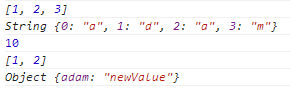
 console.log(adam);
 console.log(integ);
 console.log(arr);
 console.log(obj);