Sunday, February 10, 2019

My favorite trick in Angular / RxJS

I really love Andular and TypeScript in general, and love to work with Observables.
Observables, however, can be very hard to get done correctly, which obviously needs a lot of debugging. But how?
There are plenty of options for that, for example subscribing to an observable. This might be ok, but is a bit tedious, and doesn't tell you, if there are actually other objects subscribing to it (Subscribers). And, in my experience, is usually one of the most frequent problem by using Observables.

BUT! There is a neat way of checking if your Observable actually has subscribers or not.
Let me tell you about an RxJS operator: tap. I quote from learnrxjs.io:
Transparently perform actions or side-effects, such as logging.
What that means is that this operator does not mutate the values emitted from the Observable, this is just having a sneak peak at the values. This is very good for you to log something there and check if the Observable works.

In summary: as you could see from these 2 examples, you can debug Observables in an Angular project with many ways, but my experience told me to use the tap(console.log) "trick", because then I'm not explicitly subscribing to the Observable, rather just listening and peaking if there is someone who actually would like to subscribe for changes. Cheers!

Wednesday, December 5, 2018

NgRX debugging presentation

I held a tech talk at my current company, where I talked about Angular 7, Redux and NgRX.
Here are the slides, enjoy!
https://nagyadam2092.github.io/work/ngrx-presentation/

Thursday, October 11, 2018

Detecting Image().src = 'URL' changes

Thesedays I am working a lot with image beacons, which are basically prefetched image pixels sent from a page for tracking reasons.
It's very hard to detect when these pixels are trying to be requested, most of the testing environments are going to listen to a mock server and see if an image request was made or not.
However, with the new Reflect API you are able to listen to simple assignments like new Image().src = 'URL'.
Obviously this won't work in browsers which don't support Symbol or Proxy, but is a good way to test image beacons in fairly modern browsers.
This approach was basically stolen from this blog post: https://www.phpied.com/intercepting-new-image-src-requests/
Have fun playing around with this fiddle:

See the Pen Image beacon testing by Adam Nagy (@nagyadam2092) on CodePen.

Thursday, August 2, 2018

The early days of my web development carreer

Here is a bit different article about how software engineering in general got into my life when I was a teenager.
I think my first connection with computer science, or more specifically web development, was when I was about 10 years old (or even younger?), my father was working as a JAVA developer, and one of his colleagues in Switzerland had a homepage which was extremely simple: basically there was the name of his, some weather information about his hometown (as far as I remember) - AND (that's the most important part) a real time webcam!
"How was that real time?", you may ask, and is a very valid question.
Imagine we are in 1998, where weird browsers were popping up from every corner (without any standards, yikes!). So how could one implement a real-time webcam on a webpage?
The trick was that there was an image (which you could see as a real-time camera), which was refreshed every 10 or 20 seconds (so basically changing it's URL from JavaScript /or maybe it wasn't JS? not sure../).
That was so mindblowing for me, I couldn't really imagine I could build something like that even if I spent a whole lifetime learning it.
After that my next meeting with Computer Science was Comenius Logo. To be honest, I believe I was a very bad "programmer" back then since I thought "What is the point of this? Moving a turtle around the screen with an overly verbose way? That's just simply pointless.".

So I was not super motivated about Comenius Logo. I only remember the games which we were playing after school on Pentium 1-s (Outlaws multiplayer on LAN ftw!).

After that I basically tried myself as a "homepage developer" without knowing that I was doing any programming - since I only wrote HTML code without any coding involved. One could say it WAS programming, but I highly doubt that.
That was the time when I met MS Frontpage 2003.


So I built a homepage basically to share gaming photos about Warcraft 3 and GTA: Vice City. This homepage had a header (!), a footer (!) and also a sidebar (!!).
It was one of the best experiences developing it and uploading it via FTP to a free hosting service, which had a never disappearing ad banner at the top of every page. It was not that annoying by that time since I was like "WHOA! I have a webpage! Who cares about freaking ads?".
So yeah, that was it, after that I started to develop other very small webpages, and started to explore the world of the interwebz.

Saturday, June 2, 2018

Testing AWS Lambda function which uses S3 using Mocha and Sinon

I've been seeking through the interwebz to find a good tutorial on testing an AWS lambda function which uses it's S3 API, so here we go, this is my take on it.
The key idea behind it is to have a 4th default argument which is going to be a Sinon spy at the test, just to mock S3's behaviour. Here we go, there is the solution I came up:

Sunday, February 25, 2018

Spring framework

Although I'm working with Spring on a daily basis, sometimes it's good to revisit the basics of a framework / concept. So I did, and here are my notes. Cheers!

Configuring the Application Context

Inversion of Control

AKA Dependency Injection
Objects are injected at runtime.

Profiles

You can set profiles like develop or production to be able to branch the code.
@Profile(“develop”)     --- this anniotation makes sure to run that method.

Bean Scopes

  • singleton: Scopes a single bean definition to a single object instance per Spring IoC container.
  • prototype: Scopes a single bean definition to any number of object instances.
  • request: Scopes a single bean definition to the lifecycle of a single HTTP request; that is each and every HTTP request will have its own instance of a bean created off the back of a single bean definition. Only valid in the context of a web-aware Spring ApplicationContext.
  • session: Scopes a single bean definition to the lifecycle of a HTTP Session. Only valid in the context of a web-aware Spring ApplicationContext.
  • global session: Scopes a single bean definition to the lifecycle of a global HTTP Session. Typically only valid when used in a portlet context. Only valid in the context of a web-aware Spring ApplicationContext.

e.g.: @Scope(“singleton”)

Proxies

Since Spring 4.0 every class which is loaded into the Bean Factory gets at least one Proxy.

Annotation based configuration

@Component scan

This indicates that a class should be loaded to the bean factory.
Dependency injection is achieved through @Autowired.

Autowiring

Field level: private attributes can be autowired, but not a good practice.
Setter Injection: inject at the setter method.
Constructor Injection: good practice,  inject at the constructor. Class become immutable.


InventoryService inventoryService;

@Autowired
public OrderServiceImpl(InventoryService inventoryService) {
this.inventoryService = inventoryService;
}

Lifecycle methods

@PostConstruct: method being run after constructor.
@PreDestroy: method being run before destructor is called.

Bean lifecycle

Initialization phase:

  • Begins with creation of ApplicationContext
  • BeanFactory initialization phase
  • Bean initialization and instantiation
  1. Bean definitions loaded: from Java configuration, Bean configuration, Component scanning and aut configuration
  2. Post-process bean definitions: BeanFactory is loaded with references 
  3. Instantiate Bean: Bean pointer is still referenced in Bean Factory, Objects have been constructed, BUT not available for use yet!
  4. Setters: beans are fully initialized; all initial dependencies are injected - beans still not ready for use
  5. Bean post-processor (pre- and post-init): almost the same as Initializer
  6. Initializer: @PostConstruct methods are called here; after the step beans are instantiated and initialized, dependencies have been injects, BEANS READY TO USE

Aspect Oriented Programming (AOP)

Aspects: reusable blocks of code that that are injected into your application during runtime.
Applications:

  • Logging
  • Transactions
  • Caching
  • Security
Cross-cutting concerns: In aspect-oriented software development, cross-cutting concerns are aspects of a program that affect other concerns. These concerns often cannot be cleanly decomposed from the rest of the system in both the design and implementation, and can result in either scattering (code duplication), tangling (significant dependencies between systems), or both. - So there are code parts which are concerned at other places which would cose a lot of code duplication.

In Spring AspectJ is handling the aspecting.

Parts of a Spring Aspect:

  • Aspect: A modularization of a concern that cuts across multiple objects. Transaction management is a good example of a crosscutting concern in J2EE applications. In Spring AOP, aspects are implemented using regular classes (the schema-based approach) or regular classes annotated with the @Aspect annotation (@AspectJ style).
  • Join point: A point during the execution of a program, such as the execution of a method or the handling of an exception. In Spring AOP, a join point always represents a method execution. Join point information is available in advice bodies by declaring a parameter of type org.aspectj.lang.JoinPoint.
  • Advice: Action taken by an aspect at a particular join point. Different types of advice include "around," "before" and "after" advice. Advice types are discussed below. Many AOP frameworks, including Spring, model an advice as an interceptor, maintaining a chain of interceptors "around" the join point.
  • Pointcut: A predicate that matches join points. Advice is associated with a pointcut expression and runs at any join point matched by the pointcut (for example, the execution of a method with a certain name). The concept of join points as matched by pointcut expressions is central to AOP: Spring uses the AspectJ pointcut language by default.


Tuesday, November 28, 2017

Udemy Docker notes

I was doing a course on Docker at Udemy ( https://www.udemy.com/docker-mastery/ ), here are my notes about it.
Kudos to Brett Fisher (https://twitter.com/bretfisher) who has done an amazing job creating this course. Thanks!

http://labs.play-with-docker.com 

New command syntax

  • docker container ls
  • docker container ls -a
  • docker container start

What does docker container start actually do?

  1. Looks for the image in the image cache
  2. Then looks in remote hub (docker hub default)
  3. Downloads latest version
  4. Starts a new container based on that image
  5. Gives it a virtual IP !!INSIDE!! the docker engine on a private network
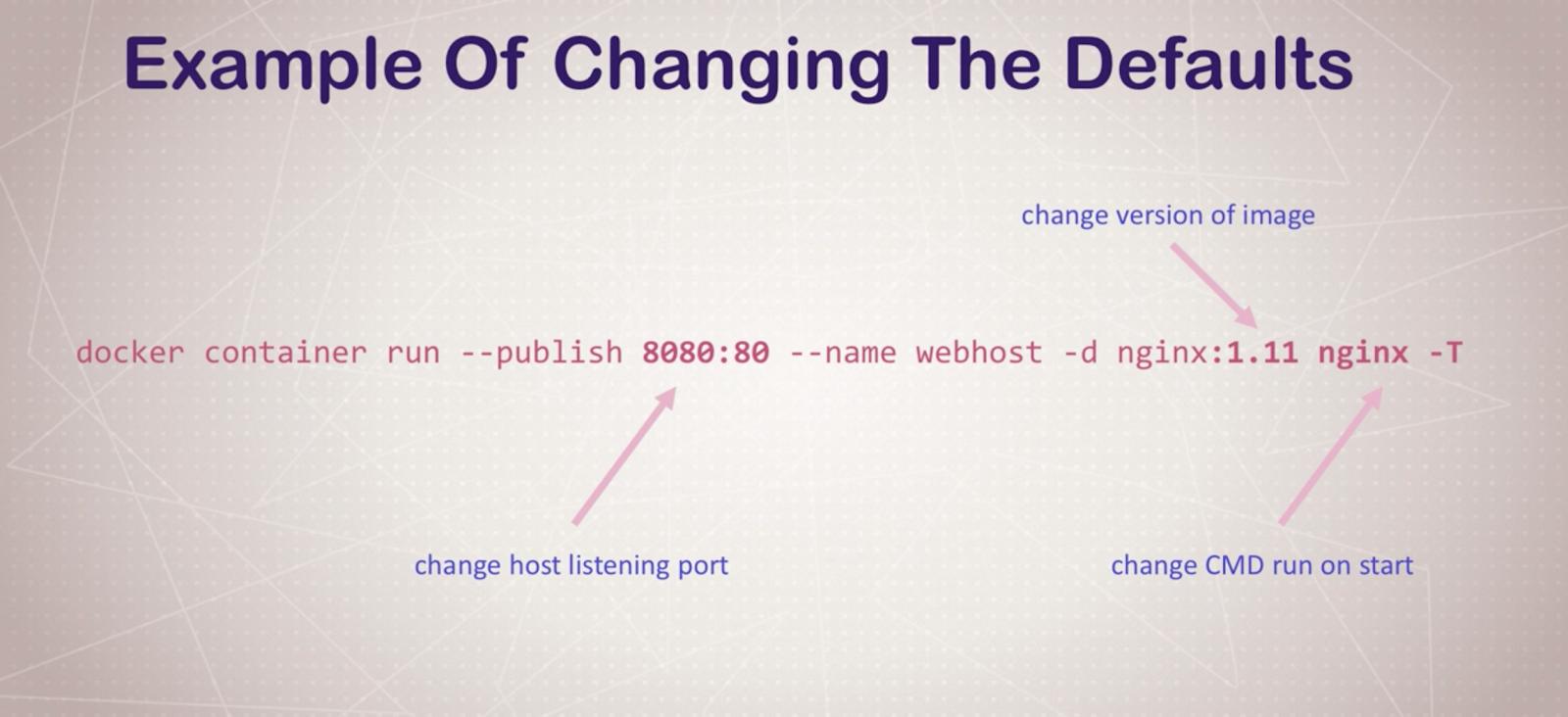
  6. Opens up port 80 on host and forwards to port 80 in container (with the --publish command)
  7. Starts container using the CMD in the image Dockerfile


Containers aren’t really VM-s: THEY ARE JUST PROCESSES

CLI process monitoring

  • docker container top: list running processes in a specific container
  • docker container inspect [ID/NAME]: gets metadata for that container (like volume, config, etc..
  • docker container stats: shows live performance measures for all the containers running


Getting a shell inside a container

  • docker container run -it: start new container interactively (with CLI, e.g. with bash)
  • docker continer exect -it: run additional command in existing container (no ssh needed!!)

-it means: interactive (keeps session open to keep terminal input), -t pseudo-tty (simulates a real terminal, like what ssh does)

Docker networks
-p: exposing ports
BUT: you don’t have to expose all the time, you can create sub virtual networks which are going to “understand” and “see” each other, so you can just define a communication without exposing ports.
docker container inspect --format '{{ .NetworkSettings.IPAddress }}' webhost: just the IP . NEAT
Communicating with two virtual networks (subnetworks) is only able to do by going out to the exposed ports to the outside and communicate over there.

Docker network CLI

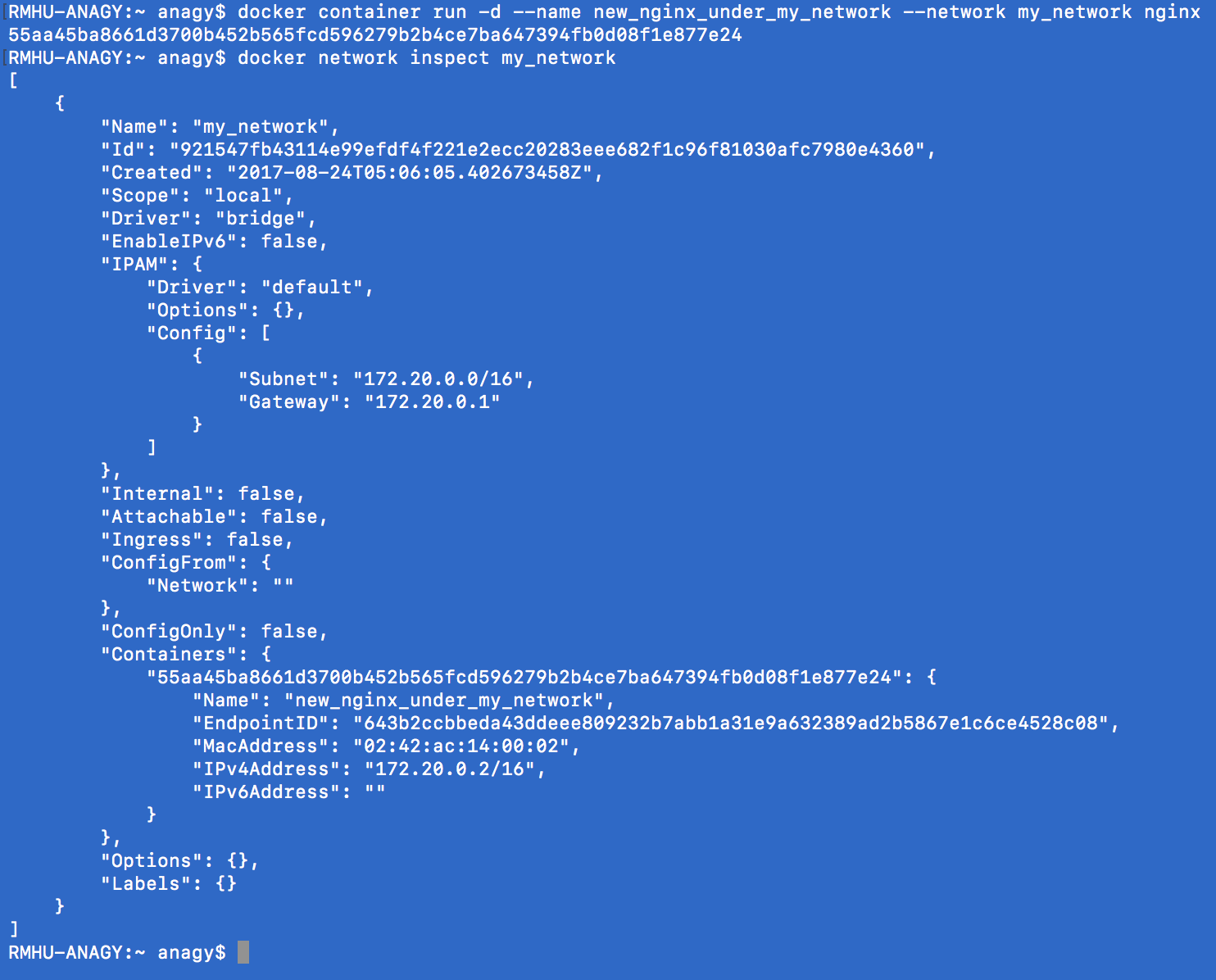
  • docker network ls: networks
  • docker network inspect: get metadata from a network
  • docker network create --driver: creates a network
  • docker network connect / disconnect

With docker swarm this is easier to do!

Docker container DNS
Docker daemon has a built-in DNS server that container use by default.
Note: IP-s are not good way to communicate, use names instead! Apps can fail and get new IP address, but it can fall back to a name with a different ID still!

Container images
What’s in an image:

  • App binaries and dependencies
  • Metadata about the image data and how to run the image

Download an image from Docker Hub.

docker pull [OPTIONS] NAME[:TAG|@DIGEST]

Image layers

  • Image layers:
  • docker image history nginx

    • history of the image layers
    • basically an image layer is a new command / change to the previous one, e.g. like the base image layer is ubuntu, and then apt-get -ing something (like mysql), and that’s going to be the next image layer
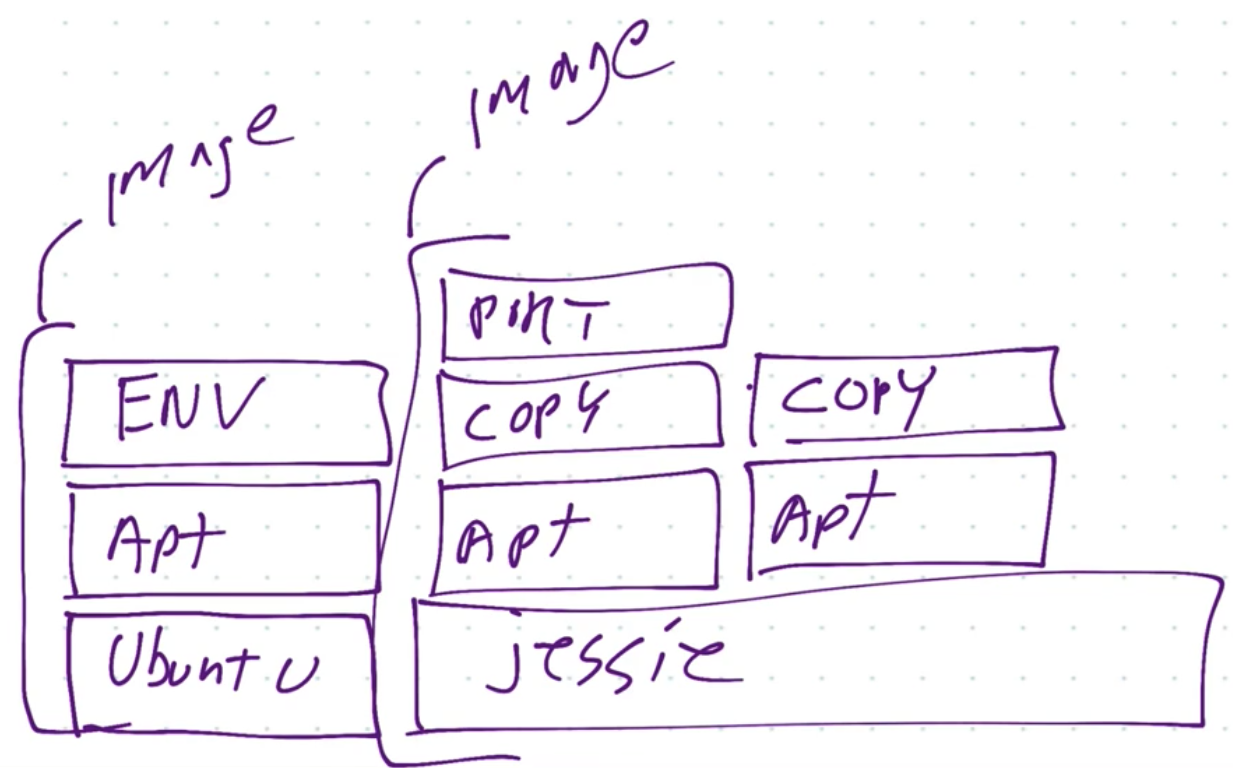
    • On the picture above you can see how caching is done: if 2 images are using jessie image layer, it is not going to be dupicated, both images will use the same jessie image (layer)
    • Image layers are saved and basically attahed together for an image (so it can save space)
    • docker image inspect nginx
  • Image tagging and pushing to docker hub
    • a very similar process like git
  • Dockerfile
    • instructions how to build our image
    • FROM: which is the starting image
    • ENV: set environment variable
    • RUN: run commands
    • EXPOSE: expose port  (you still have to run -p if you would like to expose this to the outside) - so basically I am ALLOWING the image to be exposed, but I still have to do it explicitly!
    • CMD: run a command when container is run
    • General best practice: keep the less changing things on the top of the Dockerfile and and the more changing at the bottom


Persistent Data

Volumes
Persistent data for images.
docker volume ls

Bind Mounting
Maps a host file or directory to a container file or directory.
Basically just two locations pointing to the same file(s).
CAN’T USE IN DOCKERFILE, MUST BE IN container run .
That’s really good for development - binding local files to the containers

Docker-compose
You can use sub containers to communicate with each other. Neat!
docker compose up - this is starting all the containers which are defined in docker-compose.yml file.
With docker-compose you can manage a multi-container environment easily.

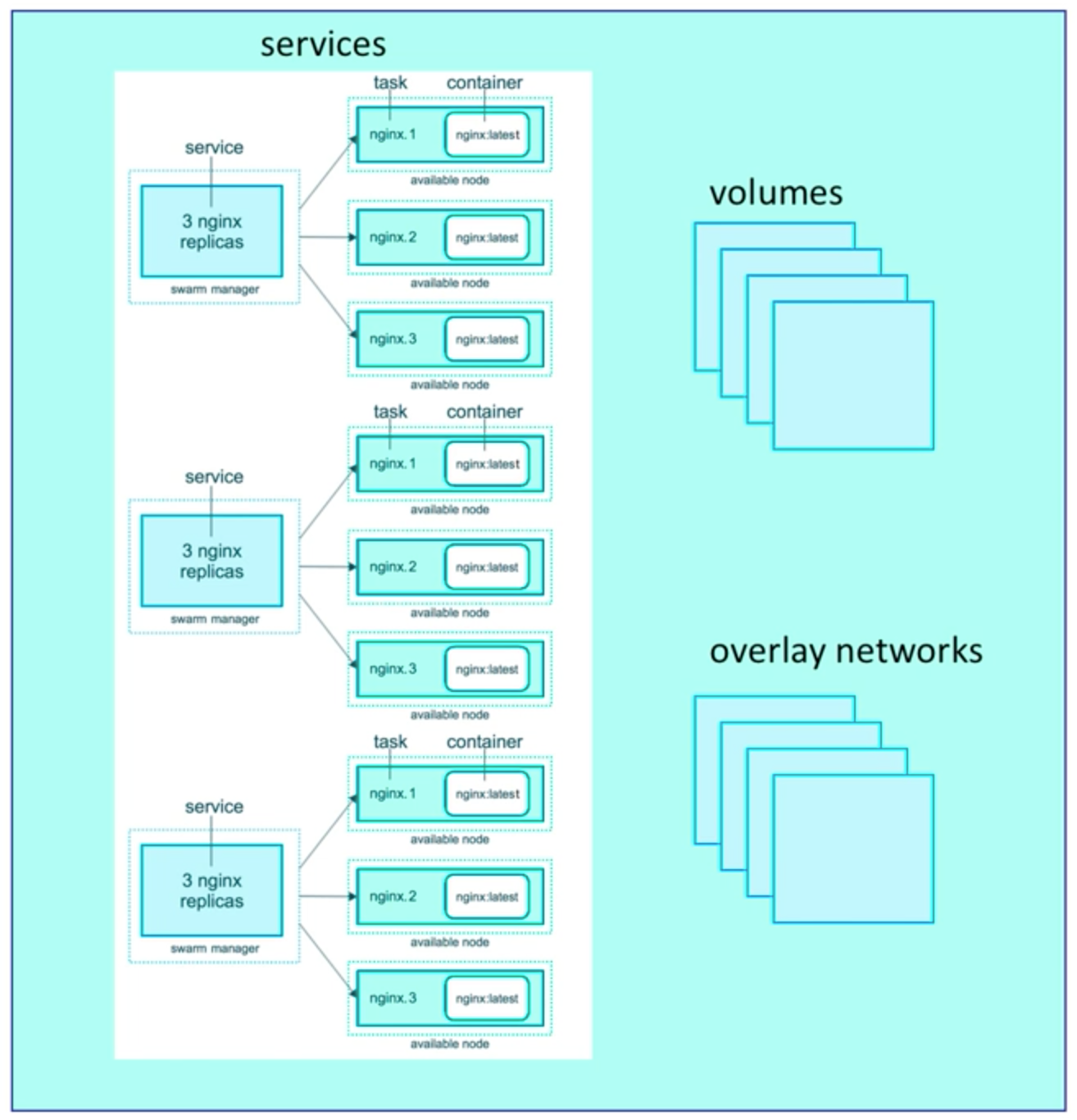
Docker swarm

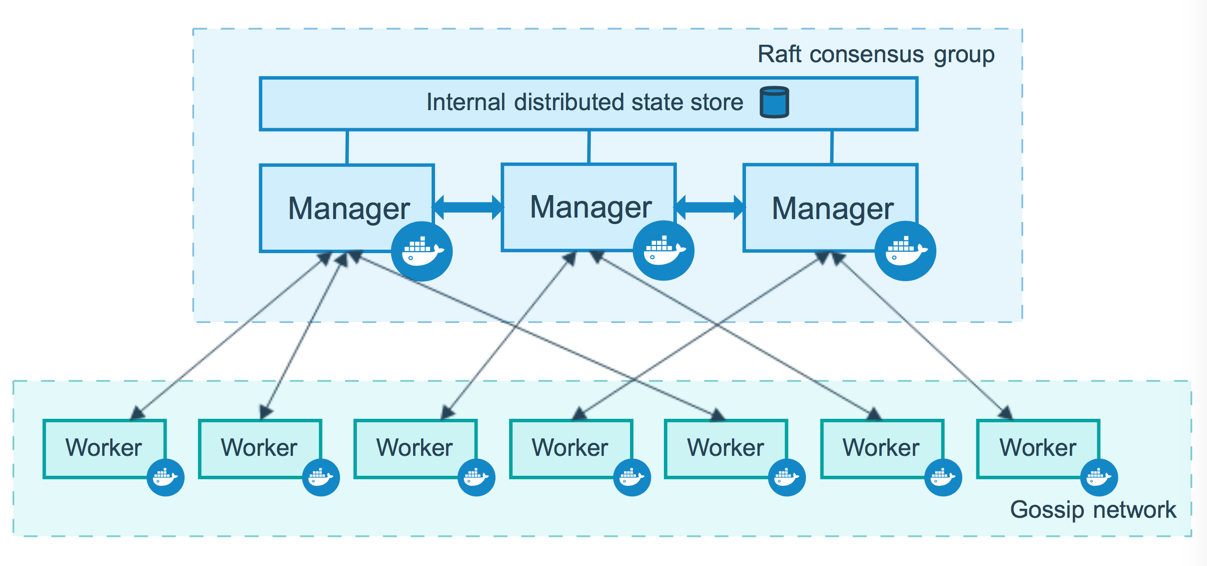
Server clustering solution.
Can orchestrate the lifecycle of your containers.
docker swarm init - enables swarm mode in an environment (so you can run your own swarm in your computer)
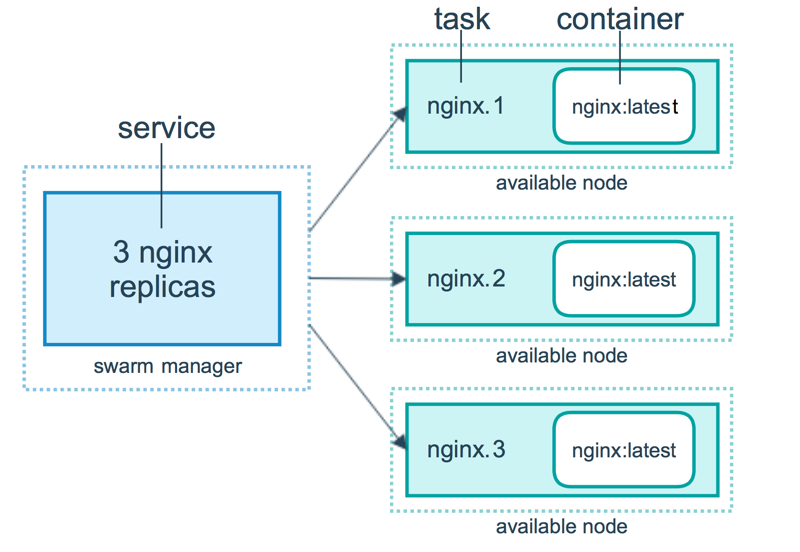
With the swarm API we are not directly communicating with containers, rather we are just communicating with the orchestration which will make sure the commands will be executed, and e.g. if a service dies, it will make sure it re-runs it!


Routing mesh
The routing mesh enables each node in the swarm to accept connections on published ports for any service running in the swarm, even if there’s no task running on the node. The routing mesh routes all incoming requests to published ports on available nodes to an active container.

Stacks

Basically compose files for swarms.
docker stack deploy
Docker compose ignores deploy and swarm ignores build. Separation of concerns.
docker-compose cli not needed on Swarm server!
1 stack → 1 swarm!

Secrets
Easiest “secure” solution for storing secrets in Swarm.
Secret:

  • usernames, passwords
  • TLS certificates and keys
  • SSH keys
  • Any data you would prefer not be “on front page of news”


SWARM & STACK & SECRETS are cool!